Used correctly, Facebook carousel ads can drive up to 10 times more traffic than traditional static ads. Featuring up to 10 images or videos—each linked to its own destination—this interactive, swipeable format makes it easy to showcase products, demonstrate features, or tell your brand story.
In this guide, we’ll walk you through the key features of carousel ads, why they’re so popular, how to create them, and practical tips for making an impact. Read on to discover how to drive clicks and conversions with this gallery-style content.
What is a Facebook carousel ad?
A Facebook carousel ad lets you showcase two to ten images or videos in one swipeable, interactive experience.
Each “card” in a carousel ad is its own mini-ad, complete with a unique headline, description, call-to-action button, and link. This means you can take viewers to different landing pages for each product or feature—something you can’t do with formats like link ads or messenger ads.
Perfect for telling a story, highlighting multiple products, or breaking down a feature, this format works seamlessly across Facebook, Instagram, Messenger, and Audience Network.
With Ads Manager, carousel ads fit into almost any placement, including:
- Facebook Feed
- Messenger
- Facebook Marketplace
- Instagram Feed
- Instagram Stories
- Audience Network
Now that you’ve got the basics, let’s dive into why carousel ads are a must-have in your marketing toolkit.
Why should you use carousel ads?
Carousel ads are a powerful tool for advertisers because they combine creativity, interactivity, and performance. As a result, this format isn’t just visually appealing—it delivers measurable results.
For example, Facebook reports that carousel ads achieve 30-50% lower costs per conversion and 20-30% lower cost per click than single-image link ads.
On Instagram, they perform just as well. A Lacoste case study revealed that using carousel ads on Instagram Stories resulted in a 61% higher click-through rate (CTR) and a 32% lower cost per click (CPC) compared to other ad formats.
Here’s why.
The swipeable nature of carousel ads encourages interaction, and the ability to link each card to a unique landing page ensures that your audience can engage with the exact product or service they’re interested in.
This combination of engagement and precision targeting makes carousel ads a standout format for driving sales and conversions.
Whether you’re showcasing a product lineup, highlighting the features of a single item, or telling your brand’s story, you can do more in a single ad format.
Let’s take a look at the many ways you can use this ad type to your advantage.
6 clever ways to use carousel ads
1. Promote multiple products in one ad
Each card in your carousel can spotlight a different product with its own image, description, and link to a dedicated landing page. This setup allows you to tailor the user experience, guiding customers directly to the products they’re most interested in.
Imagine you’re promoting a new summer collection for a clothing brand. Your carousel could feature:
- Card 1: A vibrant sundress with a link to its product page.
- Card 2: A matching pair of sandals with a “Shop Now” CTA.
- Card 3: A stylish beach hat with a description and link.
- Card 4: A group shot of the collection encouraging users to “Explore the Full Range.”
To make your carousel seamless and visually appealing, choose images that complement each other. For example:
- Use photos from the same collection or a single brand photoshoot to maintain consistency.
- Ensure a similar lighting, colour palette, or style across all cards for a polished, professional look.
By tying the visuals together with cohesive imagery and clear messaging, the carousel feels more like a curated experience rather than a random selection of products.
Pro tip: Analyse the performance of individual cards to see which products generate the most interest. Then use this data to refine future ads and improve targeting.
2. Introduce a single product
Carousel ads provide the perfect canvas to showcase a single product in-depth, offering a dynamic and interactive way to convert viewers into customers.
This format works especially well for high-value items or services that require more explanation to convert viewers into buyers.
With up to 10 slides available, carousel ads give you plenty of space to highlight key details, address potential questions, and show your product from multiple angles.
By using each card to focus on different features, benefits, or use cases, you can create a detailed, compelling ad that informs and persuades potential customers.
Let’s say you’re advertising a premium blender. Here’s how you might structure your carousel:
- Card 1: “Meet the Ultimate Kitchen Upgrade!” – A vibrant image of the blender with a hook like, “Swipe to see what it can do!”
- Card 2: Feature 1: Power and Precision – Highlight its powerful motor with a bold claim, e.g., “Crush ice and blend smoothies in seconds!”
- Card 3: Feature 2: Versatility – Showcase its multi-functionality with text like, “From soups to nut butters, it does it all.”
- Card 4: Feature 3: Easy to Clean – An image of the blender being rinsed, paired with “Dishwasher-safe parts for effortless cleanup.”
- Card 5: Customer Success – A testimonial: “I’ve never eaten healthier—this blender is worth every penny!”
- Card 6: CTA – End with a CTA: “Transform your kitchen today—Shop Now!”
Pro tip: See which cards perform best in terms of engagement or clicks. This insight can help you refine future campaigns and understand which product features resonate most with your audience.
3. Offer an exclusive deal
Carousel ads are a smart way to showcase an exclusive promotion while highlighting multiple products. Promo codes work particularly well in this format, letting you grab attention and guide shoppers through your product range—all within one ad.
Plus, platforms like Facebook and Instagram are prime spots for deal hunters. In America, over 40% of consumers turn to Facebook to find discounts, making it a powerful tool for driving engagement and sales.
By combining a carousel ad with a clear, irresistible promo code, you create a compelling reason for shoppers to click through.
Start by featuring the discount in a headline to immediately catch the viewer’s eye. For example: “10% Off Everything—Use Code FB10”.
Each card in the carousel can then highlight different products, linking directly to their respective landing pages. This keeps the focus on the deal while allowing shoppers to explore your offerings.
For example, a beauty brand could use a carousel ad to promote a sale like this:
- Card 1: A bold image with the promo code and discount details.
- Card 2: A popular skincare product with a link to buy.
- Card 3: A best-selling makeup item.
- Card 4: A bundle deal to maximise savings.
By swiping through, shoppers get a sense of the variety on offer while keeping the discount in mind.
Bonus tip: Use carousel ads to retarget users who’ve already shown interest in your products. Offering a discount can be the extra nudge they need to complete a purchase.
4. Tell a story
Storytelling is a powerful tool on social media, and carousel ads offer a creative way to bring yours to life. This format naturally encourages users to swipe through, making it ideal for unfolding a narrative piece by piece.
Whether it’s walking your audience through a sequence of events, teaching them something new with a step-by-step recipe, or sharing a series of tips, the carousel format makes your story engaging and interactive.
Pair this with visually appealing images or graphics, and you’ll capture attention while delivering your message in a digestible way.
Let’s say you’re promoting a food brand with a simple and delicious recipe for chocolate chip cookies. Here’s how your carousel could look:
- Card 1: “Bake the Perfect Chocolate Chip Cookies!” – A mouthwatering image of freshly baked cookies and a hook: “Swipe to learn how!”
- Card 2: Step 1: Gather Your Ingredients – A vibrant photo of the ingredients with text: “Flour, sugar, butter, eggs, chocolate chips, and a pinch of salt.”
- Card 3: Step 2: Mix It Up – Show the mixing process: “Combine dry and wet ingredients until smooth.”
- Card 4: Step 3: Shape and Bake – An image of cookie dough on a tray with instructions: “Scoop onto a baking sheet and bake at 180°C for 10-12 minutes.”
- Card 5: Enjoy! – A shot of the final cookies, warm and gooey, with a CTA: “Find more recipes on our website!”
Pro tip: Make sure your story flows smoothly. Use consistent visuals and messaging across all cards, and follow basic storytelling principles—set up the context (beginning), deliver the main content (middle), and finish with a strong CTA (end) to guide users to take action.
5. Share an article
Carousel ads are a great way to promote blog posts or articles while boosting newsletter signups.
By breaking down the key points of your article into visually engaging slides, you give your audience a preview of the content. You can highlight the most compelling parts of your article—whether that’s key takeaways, eye-catching visuals, or thought-provoking quotes.
If the ad resonates, viewers are more inclined to click through, explore your site, and subscribe to future updates.
Here’s how to use a carousel ad for this purpose:
- Summarise key points: Each card can feature a key takeaway or subheading from your article.Use visuals or infographics to enhance the message and make it skimmable.
- Include a clear CTA: End the carousel with a call-to-action card, encouraging viewers to read the full article or sign up for your newsletter.
- Add a link to each card: Make it easy for viewers to dive straight into the full article from any slide.
Let’s say you run a marketing agency, and your latest blog post is about “Top 5 Social Media Trends for 2026.” Your carousel ad could look like this:
- Card 1: Title of the article with a captivating visual (e.g., “Stay Ahead: 2026 Social Media Trends”).
- Card 2: Highlight Trend 1 with a brief summary and a related image.
- Card 3: Feature Trend 2 with a key takeaway and link.
- Card 4: Repeat for Trend 3 or 4.
- Card 5: End with a CTA: “Read the full article and get these insights delivered to your inbox—Subscribe Now!”
Bonus tip: Use analytics to identify your most popular articles and create carousel ads based on those. Retarget users who have engaged with similar content to maximise signups and website traffic.
6. Showcase customer testimonials
Carousel ads that feature customer testimonials can be a game-changer, especially for retargeting campaigns.
After all, not everyone makes a purchase or signs up on their first visit to your site. By retargeting these potential customers with carousel ads featuring testimonials, you build trust through social proof.
Testimonials help reinforce the value of your product or service, giving hesitant shoppers the confidence to take the next step.
Here are some best practices:
- Structure the carousel clearly: Dedicate each card to a different customer’s testimonial or review. Pair their quote with relevant visuals, such as the product they purchased, the service they experienced, or their photo (if applicable).
- Make it easy to act: Make sure each card links back to the relevant product page or a dedicated landing page. A final card can serve as a strong CTA.
Imagine you’re running a subscription box service for books. Your carousel ad might look like this:
- Card 1: A glowing quote like, “The best book subscription I’ve ever tried! So many great reads delivered monthly.” Accompany it with an image of the subscription box.
- Card 2: A testimonial that highlights the variety: “I love how they include books across genres—there’s always something new to discover,” with a picture of diverse book covers.
- Card 3: A quote focused on value: “I can’t believe how affordable this is for the quality and selection,” paired with an image of someone enjoying the books.
- Card 4: Wrap up with a CTA: “See what everyone’s talking about. Start your subscription today!”
Bonus tip: This strategy also works well with industry recognitions or awards. If you don’t have customer testimonials, highlight notable endorsements or media mentions instead. For example, “Rated #1 by [Publication Name]” or “Featured in [Industry Awards].”
Facebook carousel ad specs
Before designing your carousel ad, it’s important to familiarise yourself with Meta’s specifications for this format.
While the full design guidelines are available, here’s a quick summary to help you get started:
- Number of cards: 2 (3 on Stories) – 10
- Recommended resolution: 1080 x 1080 px (1,080 x 1,920 px on Stories)
- Aspect ratio: 1:1, 4:5 or 9:16
- Image file type: JPG or PNG
- Video file type: MP4, MOV or GIF
- Minimum number of cards: 2 – 10
- Resolution: 1080 x 1080 px (1080 x 1920 pixels on Stories)
- Aspect ratio: 1:1, 4:5 or 9:16
- Image file format: JPG and PNG
- Video file type: MP4, MOV or GIF
- Video duration: 1 second – 2 minutes
Meta Audience Network
- Number of cards: 2 – 10
- Resolution: 1080 x 1080 px
- Aspect ratio: 1:1 or 4:5
- Image file format: JPG and PNG
- Video file type: MP4, MOV or GIF
Placements for Facebook carousel ads
Facebook Feed
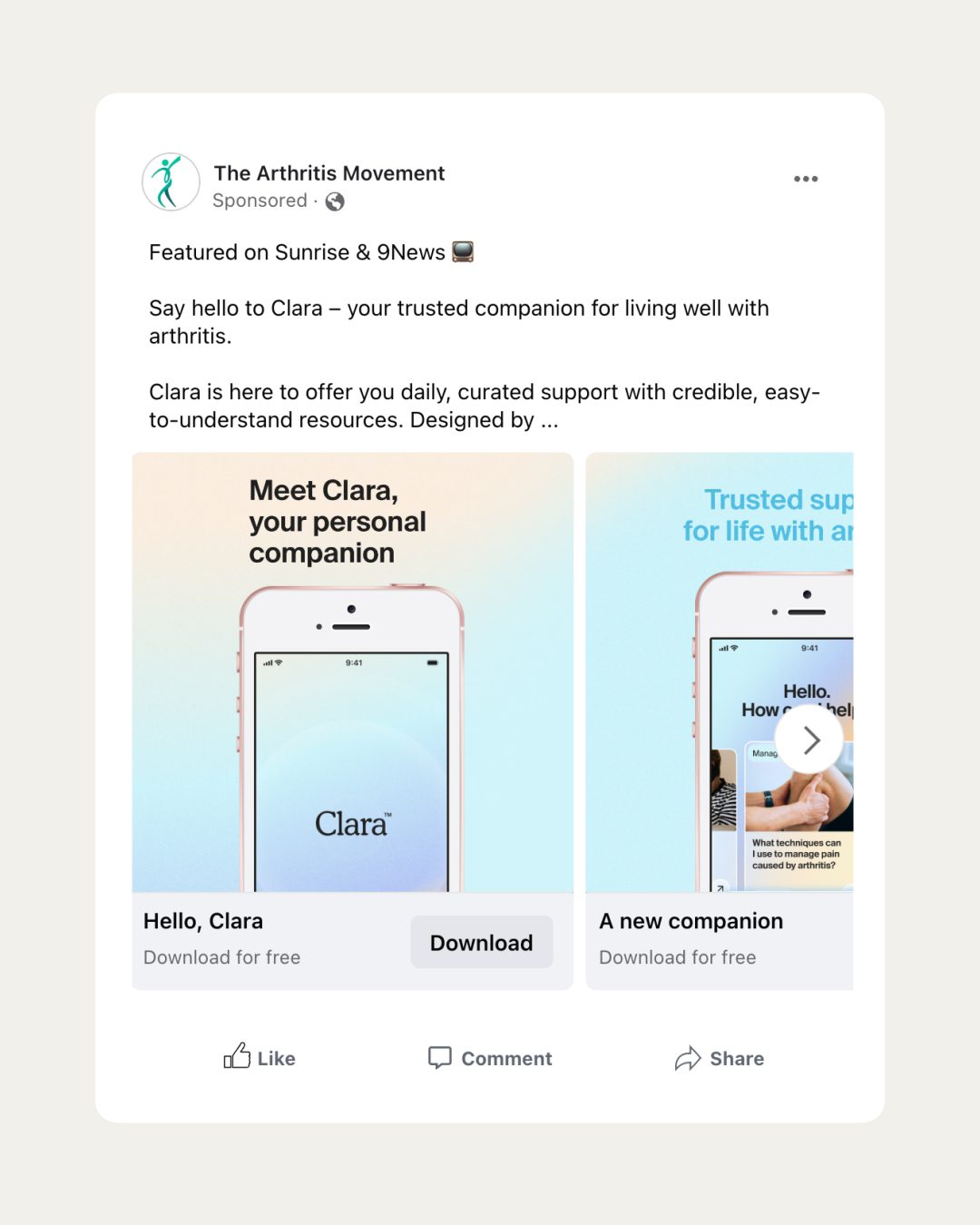
The Facebook Feed is the primary space where users engage with updates from friends, groups, and brands. As a constantly refreshing hub, it’s one of the most popular placements for ads.
Carousel ads in the Feed allow businesses to showcase multiple products, services, or brand stories that encourage users to stop scrolling and start swiping.
Facebook Search ads
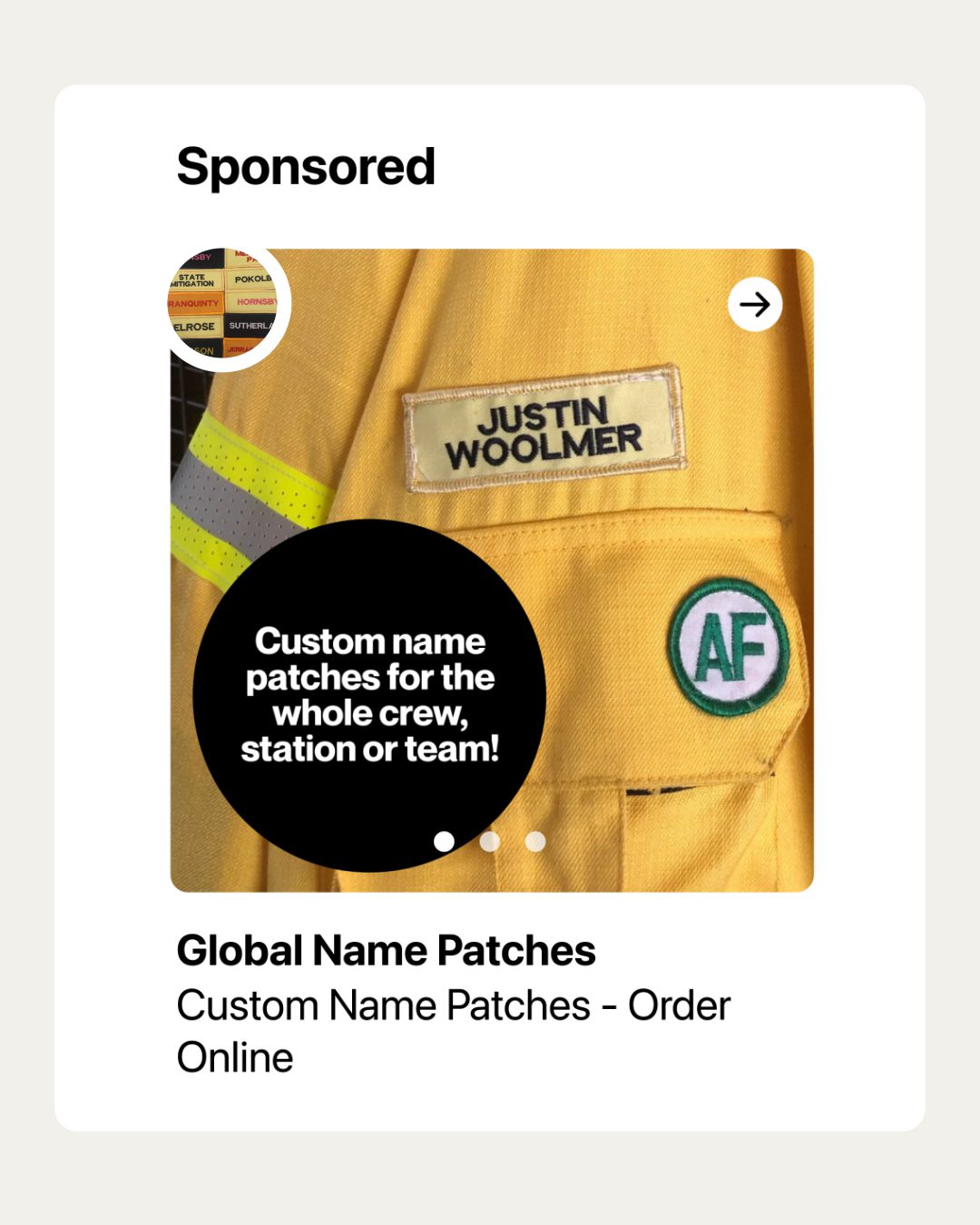
Every day, millions of users actively search for content and products across Facebook and Marketplace, making this placement a prime opportunity for advertisers.
Carousel ads in Search enable you to capture this intent-driven audience by presenting multiple cards featuring your products or services.
Adding engaging visuals, motion, and sound can further attract attention, increasing the likelihood of a click or conversion.
Facebook Right Column ads

Right Column ads are desktop-specific and appear on the side of the main Feed. While they aren’t available on mobile, they still offer high visibility for users browsing on larger screens.
When using the carousel format here, only the first card will be displayed. As a result, it’s essential to design the first card to capture interest immediately.
Despite their smaller size and square format, Right Column ads remain an effective tool for driving traffic and conversions.
Facebook Stories ads
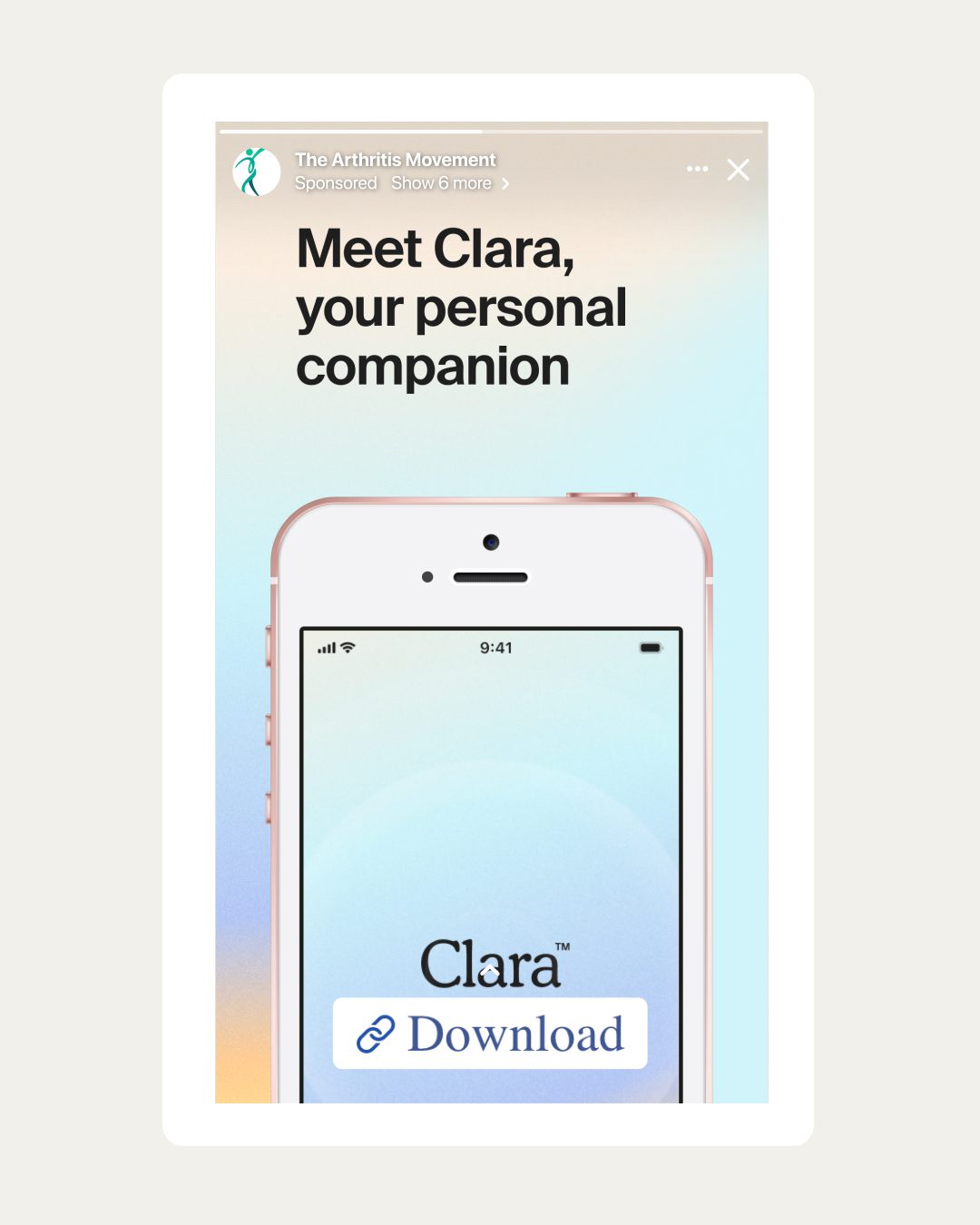
Facebook Stories appear at the top of the Feed and disappear after 24 hours, providing a premium position for attention-grabbing content.
Carousel ads in Stories allow you to display up to ten cards, each with its own link. While the first five cards are shown automatically, viewers can choose to swipe through the rest.
The vertical, full-screen format ensures an immersive experience, perfect for showcasing products, promotions, or brand narratives.
To optimise your Story ads, leave space at the top and bottom of your creative to prevent key elements from being obstructed by buttons or text overlays. Enhance engagement with stickers, emojis, or animations to make your ads feel more authentic and playful.
Facebook Business Explore ads
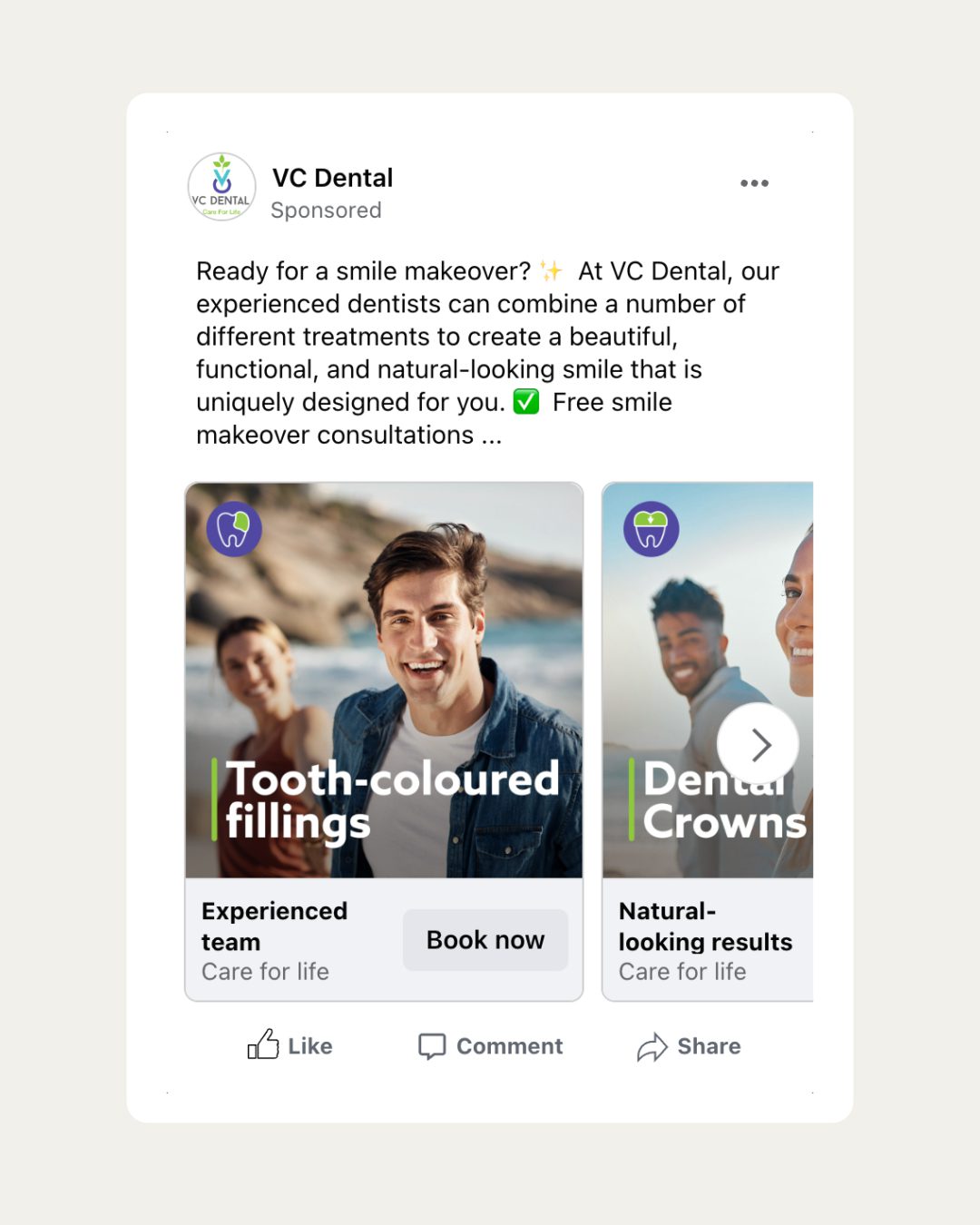
Facebook Business Explore connects your brand with users who are actively looking for business-related content. This placement is particularly effective in industries like retail, fitness, and fashion.
With carousel ads, you can present multiple cards that inspire curiosity and engagement, helping users discover your business through this discovery-focused placement.
Facebook Reel ads
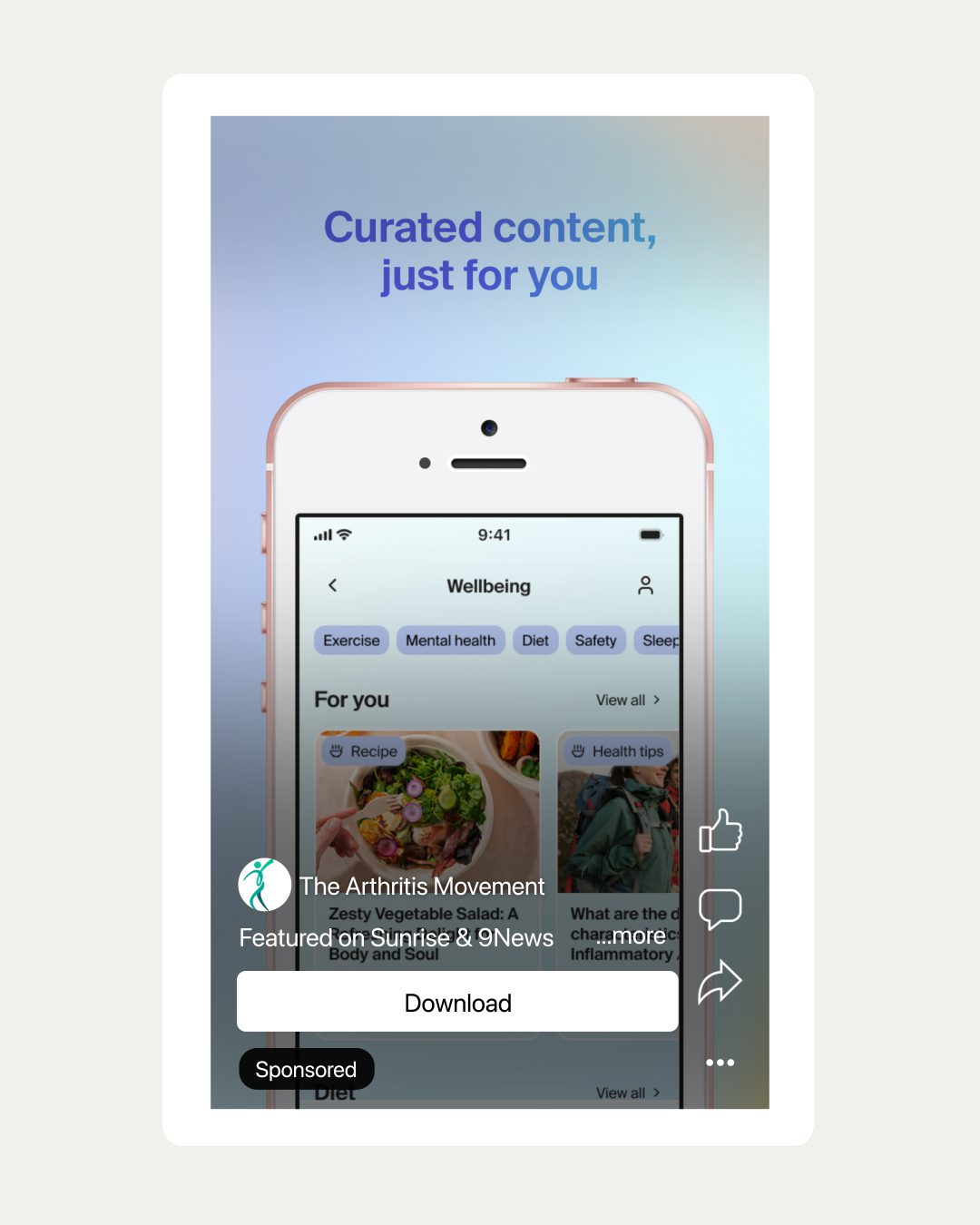
Reels are short, vertical videos that allow brands to showcase products and services in an authentic, engaging format. Reels ads appear between organic Reels, with options for users to like, comment, share, save, or skip them.
Carousel ads in Reels can highlight multiple aspects of a product or campaign, providing a dynamic storytelling opportunity. Keep critical design elements away from the edges and bottom of the creative to ensure your ad isn’t hidden under call-to-action buttons or profile icons.
Facebook Audience Network ads
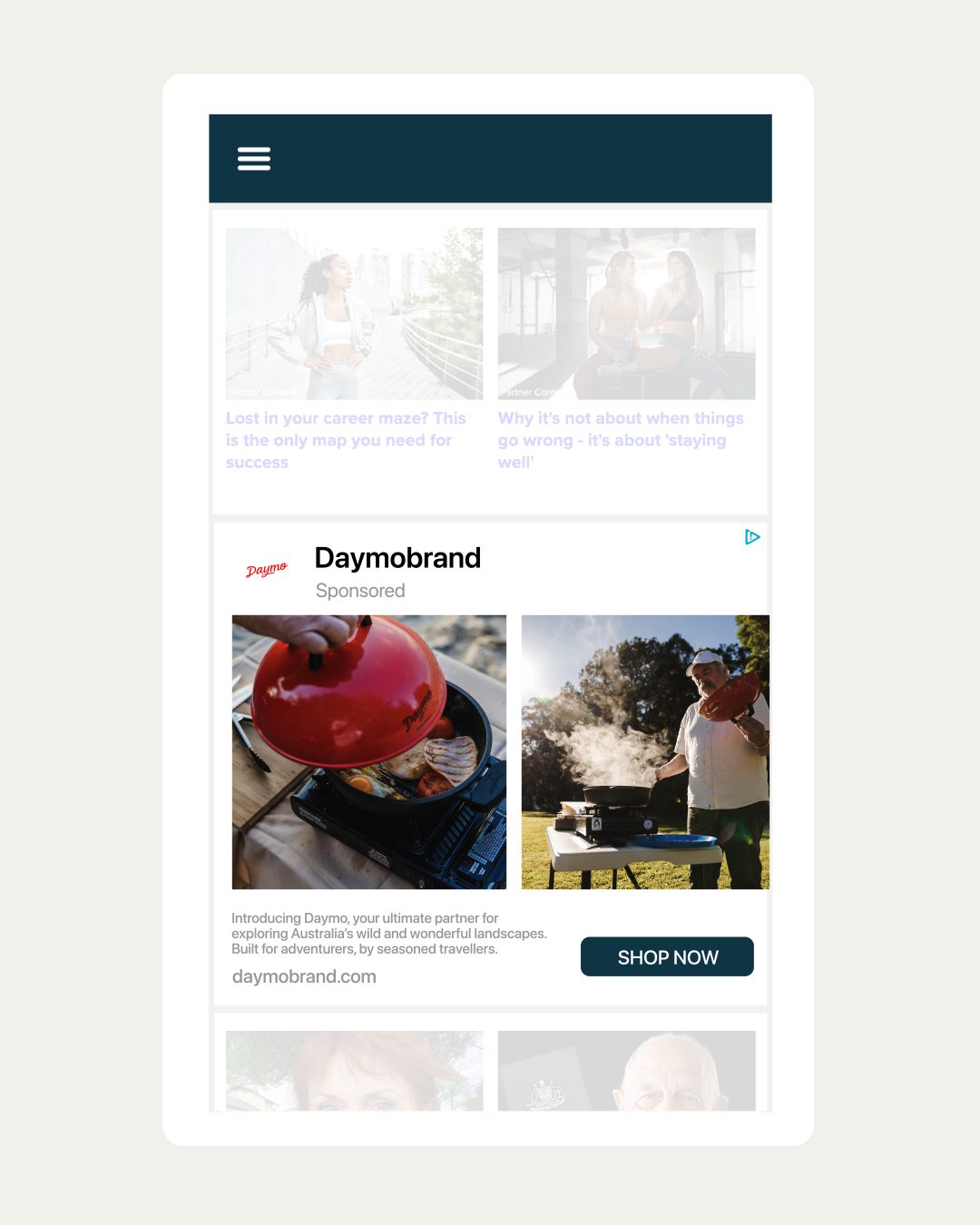
Want to extend your carousel ads beyond Facebook? Audience Network ads let you showcase your content across a vast network of apps and websites.
These ads can appear as native placements, banners, or interstitials, offering flexibility in how your carousel content is presented.
Whether it’s images or videos, the Audience Network broadens your reach while leveraging Facebook’s precise targeting to connect with new audiences.
Facebook Carousel Ads best practices
Knowing how carousel ads work is just the beginning—turning viewers into customers takes strategy. Follow these tips to craft high-performing carousel ad campaigns.
Make the first image stand out
Grab attention right from the start with an eye-catching first image or video. Since Facebook carousel ads are highly visual, the initial card plays a crucial role in drawing viewers in.
Make sure the first card is compelling enough to encourage users to swipe through the rest of the carousel and explore your offer. A strong first impression can make all the difference in engaging your audience and driving clicks.
Use sharp images
Ensure your images are sharp, high-quality, and professionally captured, particularly when promoting products.
Blurry or low-resolution visuals that lack detail are unlikely to capture attention or generate interest. Clean, detailed images make a stronger impression and help build trust with your audience.
Show a mix of images and videos
Use a blend of images and videos to create a dynamic and engaging experience. For example, if you’re promoting a fitness program, use images to showcase the transformation results or key benefits, and follow up with a video of a workout in action.
This combination helps captivate your audience while providing a fuller understanding of what you’re offering.
Make the most of ad copy
While great visuals grab attention, copy is the glue that connects your story to your audience. Done right, it can elevate your carousel ads from eye-catching to action-driving.
Here’s how to make your copy work harder for you:
Place your most important copy on the image
Most viewers are drawn to visuals before reading text, so let your images do the talking (to an extent). By embedding your most critical message directly into the image, you ensure it captures attention instantly, leaving no room for it to be missed or skimmed over.
Keep it concise, but impactful
Different ad placements have varying character limits, so tailor your copy to fit while still packing a punch. Every word counts—make each one persuasive, engaging, and relevant.
Align words with visuals
Ensure the headline and description complement the image or video on each card. Whether you’re highlighting features, benefits, or a call to action, the connection between text and visuals should be seamless.
Be consistent
If your carousel tells a cohesive story, like showcasing a single product or driving traffic to one landing page, keep the copy uniform across cards. This reinforces your message and avoids unnecessary distractions.
Add some personality
Inject some creativity into your headlines and descriptions to make them stand out. Use action verbs, emotional triggers, or even a sense of urgency to nudge users toward engagement.
Test, test, test
Experiment with different tones, messages, and layouts to find what resonates with your audience. Use performance data to tweak your copy until it hits the perfect balance between engagement and conversions.
Add a link to each card
Ads work best when they’re clickable and take people somewhere useful. With carousel ads, you can link each card to a different landing page, giving your audience a clear path to what interests them. It’s also a great way to test what works—try A/B testing different pages to see which ones get the best results and improve your ROI.
For optimal results, follow these best practices:
Match your ad content to the landing page
Each carousel card should have a clear and direct connection to the landing page it links to. For example, if a card features a specific product, ensure the link takes users directly to that product’s page, not a general homepage. This creates a seamless user experience and reduces drop-off.
Use UTM parameters
Add UTM parameters to your carousel links to track performance at a granular level. This will help you understand which card generates the most clicks and conversions for future campaign optimisations.
Optimise landing pages for mobile
Given that most users interact with Facebook ads on mobile devices, you’ll need to make sure your linked landing pages are mobile-friendly. Pages that load quickly and display well on smaller screens will significantly improve the user experience and engagement.
Include relevant CTAs
Pair each card with a clear and compelling CTA that aligns with the linked page. For example, use “Shop Now” for product-specific cards or “Learn More” for informational content. It seems obvious, but lots of businesses get this simple step wrong.
How to create a carousel ad
Here’s a step-by-step guide to creating a carousel ad in Meta Ads Manager:
1. Start by opening the Meta Ads Manager platform.
2. Click the Create button in the top-left corner to start building your campaign.
3. Choose a Campaign Objective for your carousel ad. Goals like Awareness, Traffic, Leads, App Promotion, or Sales are compatible with carousel ads. Keep in mind that objectives like Engagement and Video Views are not available in this format.
4. Provide a campaign name, indicate if your campaign falls into a special category, and decide whether to enable A/B testing or use the Advantage campaign budget feature to optimise your spending.
5. Define key details like conversion location (e.g., website, app, store), budget, schedule, and your audience targeting preferences.
6. In the Ad Setup section, select the Carousel format. You can either upload your ad content manually or let Meta automatically pull media from your product catalogue.
7. Upload up to 10 images or videos to feature in your carousel. For each card, customise the headline, description, and URL to align with your goals. You’ll see a live preview of your ad on the right-hand side, showing how it will appear across placements like Facebook feed, Instagram feed, stories, and reels.
8. Configure tracking to set up conversion events and add a URL parameter if needed to monitor campaign performance.
9. Double-check all your campaign settings and ad content. When everything is ready, click Publish in the bottom-right corner to launch your carousel ad.
How much do Facebook carousel ads cost?
The cost of Facebook ads typically falls between $0.10 and $5.50 per click, though this can vary widely depending on factors such as your target audience, campaign goals, ad placements, and competition within your industry.
When it comes to Facebook carousel ads, there’s no set price—you have the flexibility to spend according to your budget. You also have control over how you pay for your campaign.
For instance, you can establish a fixed overall budget by setting a campaign spending limit, or opt to pay based on individual results by tweaking your bid strategy.
Your full digital team for Facebook Ads
Showcasing multiple images, videos, messages and links, Facebook carousel ads are a powerful way to connect with potential customers on social media. They’re perfect for showcasing multiple products, telling a story, or highlighting key features—all in one interactive ad.
Ready to get started, but need some guidance?
We’re here to help.
At Redback, we plan, build and optimise paid social campaigns for all kinds of clients. From Ecommerce promotions to brand awareness features, our experienced team helps ensure your Facebook ads engage your audience and achieve your goals.
No dull creatives, clunky layouts, or forgettable campaigns here—just a local team of digital specialists dedicated to maximising your marketing budget with clear, professional, and impactful social ads.
To kick off your next Facebook Ads campaign, get in touch today at (02) 4962 2236 or send us an online enquiry.
New project to discuss? Need reliable support? Complete our quick enquiry form and we'll be in touch!

- What is a Facebook carousel ad?
- Why should you use carousel ads?
- 6 clever ways to use carousel ads
- Facebook carousel ad specs
- Placements for Facebook carousel ads
- Facebook Carousel Ads best practices
- How to create a carousel ad
- How much do Facebook carousel ads cost?
- Your full digital team for Facebook Ads